
ChatGPT business profiles can now be claimed through Business Hub if you are authorized to represent a business and can complete OpenAI’s verification steps. A claimed chatgpt business profile gives you a way to manage business details, pursue identity review, and access limited performance insights such as mentions and website clicks.
This matters because businesses are starting to appear more visibly in AI-generated answers, not just in search engine results. For owners, marketers, and agencies, the main question is no longer whether a chatgpt business presence exists, but how to claim it correctly without assuming it works like ads, local SEO, or a guaranteed ranking boost.
Business profiles can now be claimed through verified account access
OpenAI now lets authorized representatives claim a business inside ChatGPT through Business Hub. The process is tied to a specific ChatGPT account, which means the person starting the claim needs to use the account that will actually manage the listing after approval.
For a chatgpt business setup, the practical sequence is straightforward: sign in, open Business Hub from the sidebar, search for the business by name, select the matching listing, and complete one of the offered verification methods. If the business already has a listing, the claim request goes into review. If the business is an eligible online business, there may also be an option to add it.
Claim access is not the same as public verification. OpenAI’s help documentation separates the initial claim from later identity verification through Persona. That distinction matters because many businesses will assume that claiming a profile instantly unlocks editing, insights, and visible trust signals. It does not.
- A claim starts in Business Hub inside ChatGPT.
- The claim is attached to the managing ChatGPT account.
- OpenAI reviews the claim before granting access.
- A separate identity check is required for deeper controls.
If a listing is already claimed, OpenAI provides a dispute ownership path rather than a workaround. That is a useful control for brand governance, especially for businesses with multiple operators, former vendors, or location-level confusion.
Who is eligible to claim a business profile right now?
Eligibility is narrower than many businesses expect. OpenAI states that a business can be claimed by the owner or by someone authorized to represent it, but availability depends on both the business’s location and type.
Right now, local stores and restaurants can claim only an existing United States listing. Eligible ecommerce and online service businesses can also add a business where ChatGPT is available and the supported verification methods exist. That means a business may be legitimate but still unable to complete a claim if the market, category, or verification support is not yet active.
A chatgpt business profile is therefore best understood as a phased rollout, not a universal directory open to every company in every country. The separate business agent feature is even more limited: OpenAI says it is available to eligible ecommerce and online service businesses in the US with a website, and those businesses must also meet the Business Agents Policy.
For a quick eligibility check, look at these conditions:
- You own the business or are authorized to represent it.
- The business appears in a supported geography or business category.
- The available verification method matches your business records.
- If you want an agent, the business must meet additional US ecommerce or online service requirements.
Businesses managing several brands should also note another limitation: each distinct brand is handled separately, and central parent-level management across all brands or locations is not currently available.
Verification requires a business phone, email, domain, or store connection
The claim process depends on at least one verification path that OpenAI offers for the specific listing. The supported options named in the help documentation are business phone, business email, website domain, and Shopify store connection.
Each method verifies a different type of business control. A phone or email check confirms access to published business contact points. A domain check confirms control of the business website through a Domain Name System (DNS) TXT record. A Shopify connection confirms access to the store account for that business.
In practice, the website domain route is often the cleanest option for businesses with strong technical ownership, but it can take time because DNS changes do not always appear instantly. Phone and email checks are usually faster if the listed contact details are current. Shopify is useful for ecommerce brands already running their storefront there.
- Business phone: verify by Short Message Service (SMS) or automated call, then enter the code.
- Business email: receive a code at the business email associated with the listing.
- Website domain: add the exact TXT record shown in ChatGPT to DNS settings, then return and verify.
- Shopify store: connect the store and approve permissions inside Shopify.
If no method works because the listing is locked, OpenAI directs users to contact support. If ownership is disputed, the platform routes the issue into a formal dispute process instead of letting a second user bypass verification.
For teams that want to monitor how AI surfaces business entities after setup, an AI visibility tracking view can complement profile management, because verification alone does not tell you how often a brand is appearing in AI answers.
What does identity review unlock after a claim is approved?
Claim approval is only the first gate. OpenAI says businesses must complete identity verification with Persona before they can publish changes to business information, view insights, connect certain business data, or create an eligible business agent.
That identity review can require government-issued identification, business registration information, and proof that the submitter is authorized to represent the business. Once approved, the business can do more than just hold the listing: it can edit core details such as website, description, category, logo, delivery policy, return policy, and optional media.
The blue check matters here. OpenAI explicitly says that claiming a business alone does not give the profile a verified badge. The verified badge appears only after Persona verification is approved.
Claiming your business alone doesn’t give its profile a verified badge. The verified badge, shown as a blue check, appears after Persona verification is approved.
Identity review also unlocks insight data and, for eligible US ecommerce or online service businesses, the ability to build and publish a business agent. That agent can answer customer questions using the information the business provides, but only after review and a separate publishing step.
This is an important operational distinction for any chatgpt business profile strategy. The claim establishes control. Persona verification establishes trust and grants management capability. Publishing edits or an agent comes after those approvals, not before.
Why are mentions, website clicks, and discovery topics worth tracking?
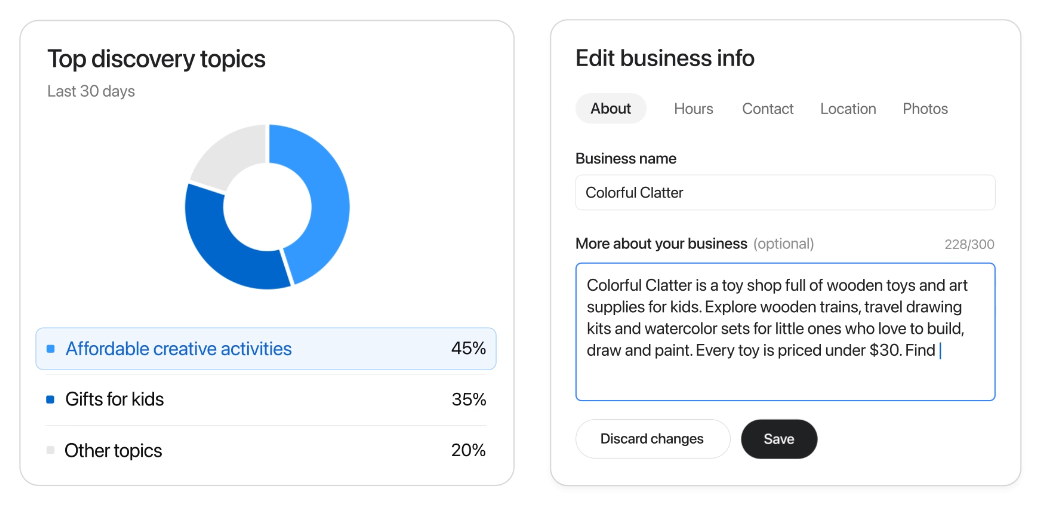
After claim approval and Persona verification, Business Hub can show aggregate activity from the past 28 days. OpenAI names three insight types: mentions, website clicks, and discovery topics. Those metrics are limited, but they are still useful because they show whether a business is surfacing inside ChatGPT at all.
Mentions are defined differently for online and local businesses. For an online business, a mention counts when ChatGPT references the business website; the brand name alone does not count. For a local business, a mention counts when ChatGPT shows a result for that location, even if the user never opens the listing or clicks through.
Website clicks are easier to interpret: they show how often users clicked through to the business site. Discovery topics are more strategic. They group common themes in ChatGPT answers that cited or mentioned the business, which can reveal how the model is framing the company in customer-facing contexts.
- Mentions show whether the business is being surfaced in answers.
- Website clicks show whether visibility is turning into traffic.
- Discovery topics show which themes are associated with the business in aggregate.
These reports are not prompt-level analytics. OpenAI says businesses do not receive individual prompts or consumer conversations, including chats with their own business agents. A blank metric also does not necessarily mean zero activity; it can mean reporting thresholds were not met, data is still being collected, or reporting is unavailable.
That makes these metrics best for directional analysis. If your team also wants to compare AI visibility with broader search performance, a generative search audit or traditional ranking data can help explain whether visibility gaps are a content problem, an entity problem, or simply limited rollout.
Claiming a profile does not boost recommendations; data accuracy is the gain
The most important takeaway is the one many businesses will miss: claiming a profile does not make ChatGPT recommend that business more often. OpenAI says this plainly in its FAQ, and it also separates business claims, agents, and advertising from ChatGPT’s independent answers.
That means a chatgpt business claim should be treated as an accuracy and governance move, not as a shortcut to distribution. The value is real, but it is different from what many marketers expect. You gain a way to verify ownership, correct business details, add product or policy information where eligible, and inspect limited engagement signals. You do not buy ranking, guaranteed inclusion, or favored placement.
Claiming lets you manage the information you provide about your business. It doesn’t guarantee increased visibility or give you direct control over ChatGPT’s independent recommendations.
The businesses that should act first are the ones most exposed to customer questions in AI interfaces: ecommerce brands, online service companies, multi-location operators with existing US listings, and any business already seeing AI-driven referral traffic. For those teams, the decision is less about promotion and more about whether inaccurate or incomplete business data is worth leaving unmanaged.
If your business qualifies, claim the profile now, complete verification carefully, and treat the resulting data as part of a wider discoverability program. A claimed profile improves control over how your business is represented. The hard work of earning visibility still depends on clear site information, strong content, and consistent signals across the web.
FAQs
How do you claim a ChatGPT business profile?
Sign in to the ChatGPT account that will manage the listing, open Business Hub, search for the business, select the correct listing, and complete one of the available verification methods. If the listing already exists, OpenAI reviews the claim before granting access.
Does claiming a business profile in ChatGPT give you a verified badge?
No. Claiming a profile only starts account-level control of the listing. The verified badge appears only after OpenAI approves a separate Persona identity verification.
What verification methods are available for a ChatGPT business profile?
OpenAI may offer verification by business phone, business email, website domain via DNS TXT record, or Shopify store connection. The available options depend on the specific listing and business type.
Who is eligible to claim a business profile in ChatGPT right now?
Eligibility is limited. OpenAI says owners or authorized representatives can claim supported businesses, but availability depends on business type, geography, and supported verification methods. Existing US local listings are the main option for stores and restaurants, while some eligible ecommerce and online service businesses can add a profile where supported.
Does claiming a ChatGPT business profile improve recommendations or visibility?
No. OpenAI says claiming a profile helps businesses manage the information they provide, but it does not guarantee increased visibility or direct control over ChatGPT’s independent recommendations.